SteerLatch for developers: Git, local tests and AI-assisted code review
A reproducible workflow for using SteerLatch with an AI assistant on an authorized Git repository, reviewing differences and testing without deploying.
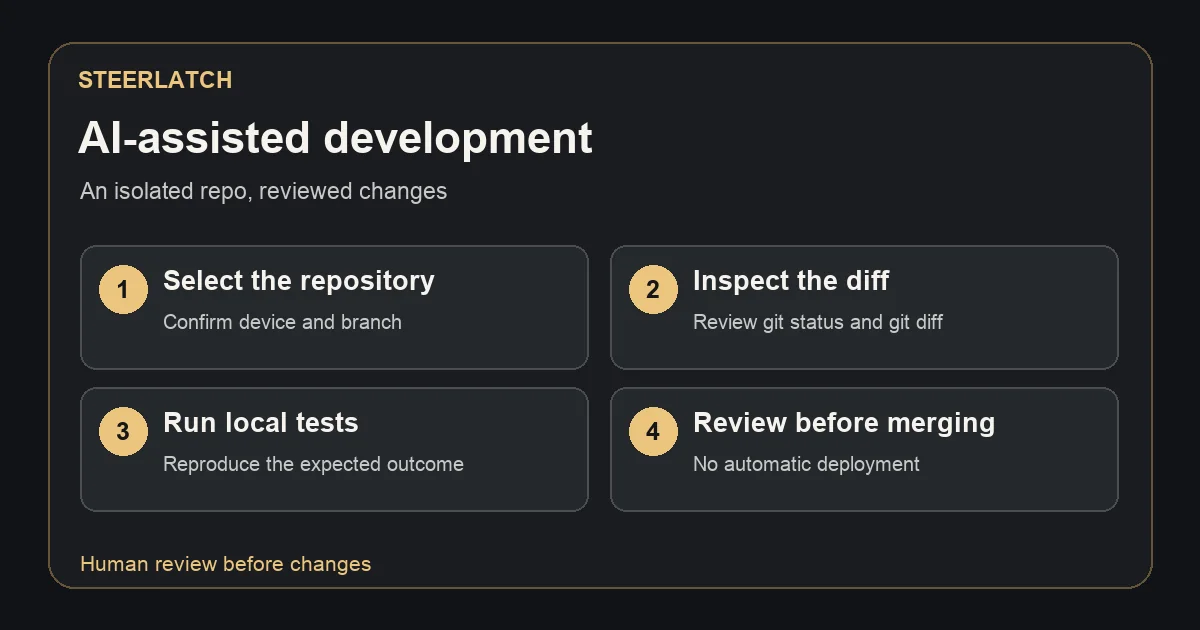
An AI coding assistant that can read files and run commands on an authorized computer must respect the repository scope and review process. SteerLatch is an MCP connector, not an automatic deployment service. Try this exercise with a test repository containing no secrets or customer code.
1. Define the workspace
Prepare a fictional Git repository with a test branch and a README. Identify the authorized computer, the repository directory and the branch. Ask the assistant to verify all three. If unrelated changes are present, stop and clarify their origin.
2. Inspect the state before editing
git status --short helps identify changed tracked files and untracked files. git diff shows unstaged differences, and git diff --cached shows differences staged for the next commit. These checks complement each other. They do not prove correctness or necessarily expose all ignored files.
3. Test a small change
Choose a reversible change such as fixing a typo in the README. Ask for a proposal first, then apply it on the test branch after approval. Inspect the exact difference. For a software project, use its documented local tests and compare results before and after. Do not run unknown scripts or install global dependencies without review.
4. Prepare a review rather than automatic publication
The report should identify the device, repository, affected files, commands executed, test outcomes and remaining risks. Keep control of merging and deployment. A passing local test does not prove that a production service is working.
An instruction to try
On Test-Dev, inside the fictional Demo repository only, check the branch and git status. Propose a README correction and show the expected diff. Do not write anything, access secrets, run network commands or publish without approval.
Limits and good practices
An MCP-compatible tool does not guarantee code quality. Repository permissions, company policies, backups and human review still matter. STOP does not revert completed edits. Keep production credentials out of test environments.
Discover SteerLatch
To check assistant compatibility and permissions, visit the official SteerLatch website · Documentation · Related practical guide.