MCP Apps: when an interactive interface adds value to an AI tool
Understand MCP Apps, separate tools from interfaces and review fictional invoices without confusing visualization with authorized actions.

An assistant can call an MCP tool and show its result in a conversation. A twenty-row table may be easier to review in an interactive view. MCP Apps enables this in compatible hosts, without turning every connector into a graphical application.
Tool, result and interface are distinct
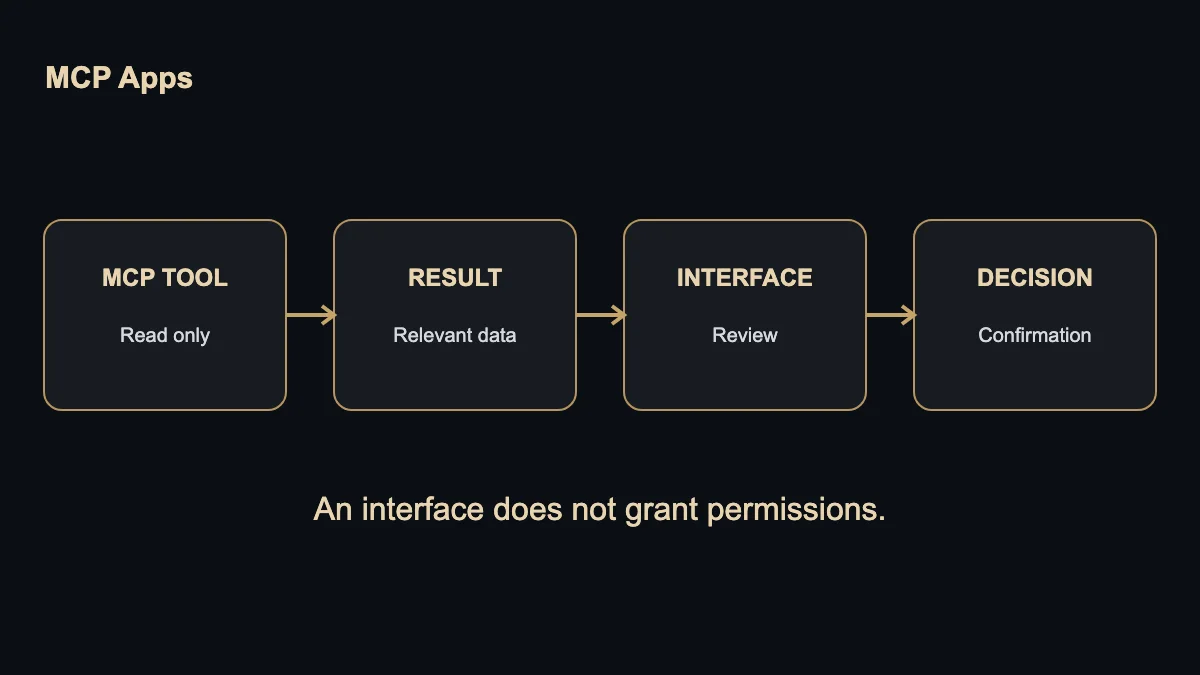
The MCP server exposes tools. An MCP App associates a tool with a UI resource that a compatible host fetches and displays inside an isolated iframe. The view presents results and communicates with the host through the protocol. It grants no new permissions: operations remain subject to authorization and server enforcement. Sandboxing prevents direct access to host DOM and storage, but cannot eliminate every authorization mistake or data leak.
Worked example: review invoices before acting
For six fictional invoices totaling €2,400, a read-only tool returns amounts and statuses. A view filters due dates and shows two invoices to review (€300 and €450, or €750). The visualization does not send reminders or pay invoices.
- Call a read-only tool with necessary fields only.
- Show amounts, dates, provenance and missing data.
- Allow reversible selection without writing to the source system.
- Before a write, show the two rows, destination and effect; request explicit confirmation.
- Read back the source and distinguish success, refusal and unknown state.
Provide an understandable textual result if the host cannot render the view. A simple summary needs no interactive interface.
Five checks before relying on an app
- Compatibility: verify client version and actual extension support.
- Permissions: test server-side rejection independently of visible buttons.
- Data: display necessary fields only; never embed secret tokens.
- Accessibility: check keyboard navigation, labels, contrast and small screens.
- Resilience: test incomplete results, network failure and duplicate confirmations; prevent repeated writes server-side.
When does a view add value?
A filterable list, time-slot selection and preview before a write are good candidates. A one-off summary or decision needing a written explanation may not benefit from a graphical view.
Frequently asked questions
Does MCP Apps work everywhere MCP works?
No: verify the host and declared UI resource.
Does a view replace OAuth?
No. Authorization, server enforcement and human decisions remain separate from presentation.
Does this guide announce a SteerLatch integration?
No. It describes a general extension. Read our MCP overview for the underlying protocol.